


Finelo: Master Trading
4.313.17K Reviews
App Specs
- Version
- 1.27.43
- Updated On
- License
- Free
- Downloads
- 1,000,000+
- Developer
- Finelo Limited
- Categories
- Education
- Platform
- Android, iOS
Screenshots



 Analysis by AppCompare
I find a trading education app most useful when it helps me slow down and understand what I’m looking at, rather than nudging me toward a quick decision. That matters even more on a shared phone or tablet, where one person’s learning can easily be mistaken for another person’s trading plan. Finelo: Master Trading is aimed at learning about trading, with chart analysis and tools that can help make market concepts feel less abstract. I’d treat it as a place to study and practise, not as a shortcut to confident investing.
When one device serves several people
Imagine a household member opening the app after dinner to look through a lesson, while someone else uses the same tablet later to check a chart. That ordinary routine is where clear boundaries matter: the person studying should know which account is open, and anyone sharing the device should avoid treating another person’s notes, settings, or activity as their own. I would not assume that a shared device automatically means shared learning history or a coordinated household plan. Before settling into a routine, I’d check whose account is active and agree that each person will keep their own decisions separate.
That separation is useful even when everyone is only learning. Trading examples can feel personal once they involve familiar companies or currencies, but discussing an idea is not the same as agreeing to act on it. I’d use a household conversation to compare what each person learned, not to turn one person’s app session into instructions for the others.
Setting up with sensible boundaries
The app is free to download, but it includes in-app purchases priced from $9.99 to $99.99 per item. I’d look at the available purchase details before committing, especially if a family member might use the device or if purchases are handled through a shared store account. Free access is a reasonable way to see whether the teaching approach suits you; it shouldn’t be treated as a promise that every learning tool will be included at no cost.
There’s also a practical distinction between learning about markets and placing trades. I’d keep that distinction explicit for anyone new to the subject: chart analysis can help you interpret patterns, but it cannot remove uncertainty or make an outcome predictable. If your goal is to trade through a brokerage, you’ll need to consider that as a separate task and evaluate the provider, risks, and costs involved. An educational app is not a substitute for those checks.
Coordinating without mixing up decisions
For two people learning together, a simple routine can make the app more useful without assuming it has household coordination features. One person can choose a concept to study, then explain it in their own words; the other can ask what evidence would change that interpretation. That small exercise helps reveal whether someone understands a chart idea or is only repeating a term. It also discourages the easy mistake of treating a confident-looking analysis as a guarantee.
I’d be especially careful about notifications on a shared device. A market alert can interrupt the wrong person or prompt an impulsive conversation when someone is busy. If alerts are available and you choose to use them, decide who they are for and whether they belong on a device other people rely on. For a learner, scheduled study time may be calmer than reacting to every movement that catches their attention.
Worth Reading Before You Choose

EA SPORTS FC Mobile 26 Is a Bigger Football Game, but It Takes Time

Flipboard Shows What News Apps Must Do Beyond the Feed

Switching to Android Auto Means Rethinking Your Driving Routine

Google Calendar Makes a Crowded Week Easier to Manage

Ludo King Makes the Most of the Minutes Between Plans

Baby Panda World Brings Quick Play to Modern Phones, but Its Game Library Feels Busy
Age, trust, and learning expectations
Finelo is rated Teen, which makes it more appropriate for older learners than for young children, but an age label alone doesn’t teach financial judgement. I’d still talk through the difference between practice, education, and real financial risk. A teenager can learn vocabulary and how to question a market claim without being encouraged to make financial decisions on behalf of the household.
The app is developed by Finelo Limited and sits in the education category. Its average rating is 4.6 from around 25,000 ratings, with roughly 3,400 written reviews, and it has over 500,000 installs. Those figures suggest that many people have tried it, but they don’t tell me whether its teaching style will fit a particular learner. I’d judge that by whether the lessons help you explain an idea clearly and recognize what remains uncertain.
On Android, the current version is 1.25.1 and the minimum operating system requirement is Android 10. It was released on September 29, 2024. If you’re installing it on an older device, checking the operating system first can prevent a frustrating dead end; on a household device, I’d also make sure the person who will use it can access the right account and understands any purchase prompts.
Learning with Finelo
As soon as you fire up Finelo, you're greeted with a sleek and intuitive interface. Setting up an account is a breeze, and I was pleasantly surprised by the minimal amount of information required to get started. Within minutes, I was exploring the app's features, feeling like a pro already.
The app offers a comprehensive tutorial for beginners, which is a nice touch. It's like having a personal trading coach in your pocket. The tutorial walks you through the basics of trading, helping you understand market trends and how to make informed decisions. This is perfect for someone like me who's still learning the ropes.
Features That Stand Out
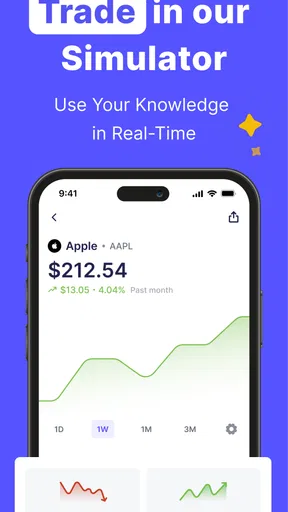
One thing I love about Finelo is its real-time data updates. You can track your favorite stocks and currencies with ease. The app provides detailed charts and analytics, making it simple to follow market movements. I found myself checking the app frequently throughout the day just to stay updated.
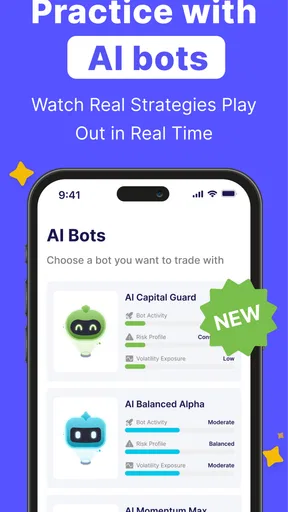
Another standout feature is the virtual trading simulator. It's perfect for testing out strategies without the risk of losing real money. I spent hours playing around with different tactics, and it was both fun and educational. Plus, there's a vibrant community of traders within the app, ready to share tips and insights.
Turning a quick check into a useful lesson
A practical way to use chart tools is to begin with a question rather than a prediction. For example, during a lunch break, I might choose one familiar market chart and write down what I think its recent movement shows. Then I’d look for a reason my first interpretation could be wrong. This turns a quick glance into a small exercise in observation, and it keeps the chart from becoming a prompt to act immediately.
I’d also avoid tracking too many assets while I’m still learning. Watching a short list makes it easier to notice how a lesson applies, while a crowded watchlist can make every fluctuation seem urgent. The useful trade-off is focus over coverage: fewer charts, considered more carefully, are often better for a beginner than trying to follow everything at once.
When using a simulator, I’d treat each practice decision as a note about my reasoning, not as proof that a strategy works. A simulated result can help me ask whether I followed my plan, but it can’t recreate every pressure or consequence associated with real money. The learning value comes from recording why I made a choice and what I would check next time, not from celebrating a lucky outcome.
My Experience with Performance
Performance-wise, the app runs smoothly. I didn't encounter any lag or crashes, even when navigating through complex charts. This reliability is crucial, especially when dealing with real-time data. The developers have clearly put a lot of effort into ensuring the app runs efficiently.
Finelo also offers notifications for significant market changes. This feature keeps you in the loop and helps you make timely decisions, which is essential in the fast-paced world of trading.
Where it fits among learning options
Compared with a general finance textbook or a long-form course, an app like this is easier to dip into between other tasks, and charts give abstract vocabulary something visual to attach to. Compared with reading market news, guided learning is more useful when you need foundational context rather than another headline. The trade-off is that short, interactive sessions can make a complicated subject feel simpler than it is. I’d pair app-based learning with slower reading when I need to understand risk, terminology, or the reasons behind a market event.
It may not be the right choice for someone who already has a structured curriculum, wants in-depth academic instruction, or needs personalized financial advice. In those cases, a more comprehensive course, a trusted reference book, or a qualified financial professional may be a better fit. I’d also skip it if my main goal were simply to execute trades: learning tools and market access are different needs, and I wouldn’t choose an education app as a replacement for a dedicated trading service.
For a beginner deciding whether to try it, the useful test is not whether the charts look impressive. It’s whether, after a short session, you can describe what you learned, name one uncertainty, and resist treating an analysis as a promise. If that kind of reflective practice suits you, the app has a clearer purpose than simply checking prices throughout the day.
Wrapping It Up
Overall, my experience with Finelo has been quite positive. It's a robust app that caters to both beginners and seasoned traders. With its user-friendly interface and comprehensive features, it's a great tool for anyone looking to dive into the world of trading.
The app is available on both Android and iOS, and if you're curious, you should definitely give it a try. Whether you're just starting or looking to enhance your trading skills, Finelo has something to offer. Happy trading!
My household recommendation is more specific: I’d use it as a shared conversation starter only when each person has clear account boundaries and understands that learning is not a trading signal. It suits curious beginners who want chart-based practice in manageable sessions, including older teens learning alongside an adult. I’d choose another route for anyone seeking guaranteed outcomes, individualized financial guidance, or a tool whose main job is executing trades. Used with patience, its strongest contribution is helping learners ask better questions before they make decisions.
Pros
- User-friendly interface for beginners.
- Comprehensive trading tutorials available.
- Real-time market updates.
- Wide range of trading tools.
- Secure transactions with encryption.
Cons
- Limited customer support hours.
- Subscription required for premium features.
- No demo account for practice.
- High data usage for live updates.
- Complex for non-traders.
FAQs for Finelo: Master Trading
What is Finelo: Master Trading and who is it for?
Finelo: Master Trading is a comprehensive mobile app designed for both novice and experienced traders looking to enhance their trading skills. It offers a variety of tools, simulations, and educational resources, making it ideal for anyone interested in mastering the art of trading in a risk-free environment.
What features does Finelo: Master Trading offer?
Finelo: Master Trading provides a range of features including real-time market data, interactive tutorials, simulated trading environments, and customizable alerts. It also includes community forums where users can discuss strategies and insights, making it a comprehensive platform for learning and practicing trading.
Is Finelo: Master Trading suitable for beginners?
Yes, Finelo: Master Trading is designed with beginners in mind, offering easy-to-follow tutorials and a simulated trading environment. This allows new users to practice and learn without the risk of losing real money, making it a perfect starting point for those new to trading.
Are there any subscription fees for using Finelo: Master Trading?
While Finelo: Master Trading offers a free version with basic features, there are subscription plans available that provide access to advanced tools and resources. These premium features include detailed analytics, personalized coaching sessions, and exclusive market insights, aimed at enhancing the user experience.
How does Finelo: Master Trading ensure security and data privacy?
Finelo: Master Trading prioritizes user security and data privacy by implementing advanced encryption methods and secure data storage solutions. The app regularly updates its security protocols to protect user information and ensure a safe trading environment, adhering to industry standards and regulations.


